

The bell is about to ring. You covered the lesson, but do your students actually understand it? Without a quick check, it’s easy to move on to tomorrow’s plan without knowing who’s ready and who’s already lost.
Used consistently, exit tickets give teachers a fast way to see what students understood, identify what needs reteaching, and decide what should happen in the next lesson.
This article covers 25 practical exit ticket ideas you can use tomorrow, grouped by purpose, plus a decision framework, examples by grade and subject, and a simple way to make one interactive.
What is an exit ticket?
An exit ticket is a short activity students complete at the end of class to show what they learned. It’s typically one to three questions related to the lesson objective. Teachers review the responses to decide what to reteach, review, or move on from before the next lesson.
Why Exit Tickets Matter
Research on formative assessment consistently shows that frequent, low-stakes checks for understanding improve student outcomes. A meta-analysis by Black and Wiliam (1998) found that formative assessment practices produced significant learning gains, with the largest effects for students who struggled most. Exit tickets are one of the simplest ways to put that research into practice — they take two to five minutes, require no grading overhead, and give teachers a direct snapshot of student thinking while the lesson is still fresh.
Teachers who use exit tickets consistently report three benefits: they catch misconceptions before they compound, they spend less time reteaching what students already know, and they make the next day’s lesson more targeted. Over time, exit tickets also build a habit of reflection – students learn to monitor their own understanding instead of passively moving on.
Today’s exit ticket
- What is one thing you learned?
- What is still unclear?
- Answer one question about today’s lesson.
Turn Today’s Lesson Into a 5-Minute Exit Ticket
25 Exit Ticket Ideas
These exit ticket ideas are grouped by what you’re trying to learn from your students. Pick the group that matches your goal for the day.
Exit Tickets for Checking Understanding
1. One-Question Knowledge Check
Ask a single question tied directly to today’s lesson objective. It’s the fastest way to get a read on the whole class.
Example: In your own words, what causes seasons to change?
Best for: Short lessons or when time is tight.
What it tells you: Whether students grasped the core idea of the lesson.
2. Three-Question Quick Check
Use three short prompts to cover what students learned, what they can explain, and what’s still confusing.
Example: What did you learn? What can you explain? What is still confusing?
Best for: Lessons with more than one key idea.
What it tells you: A fuller picture of understanding, not just a yes/no read.
3. Multiple-Choice Check
Write one carefully constructed question with plausible wrong answers based on common mistakes.
Example: Which of these best describes photosynthesis? (A–D)
Best for: Fast grading and quick class-wide patterns.
What it tells you: Which specific misconception is most common.
Try it: Create this as a trivia game for instant grading.
4. True or False + Explain
Require students to explain their answer, not just guess true or false.
Example: True or False: All fractions with a bigger denominator are bigger numbers. Explain your answer.
Best for: Surfacing misconceptions, not just recall.
What it tells you: Whether students understand the reasoning, not just the answer.
Try it: Use these ready-made true or false questions as a starting point.
5. Choose the Best Example
Give several examples and ask students which one best demonstrates the concept.
Example: Which sentence below is a metaphor, and why?
Best for: Checking application, not just definition.
What it tells you: Whether students can identify the concept in context.
Try it: This or that questions are a lighter version of this format.
Exit Tickets for Finding Misconceptions
6. Fix the Mistake
Show an incorrect solution or statement and ask students to find and fix the error.
Example: Here’s a solved equation with one mistake. Find it and correct it.
Best for: Math, science, and any step-by-step process.
What it tells you: Whether students understand the process well enough to spot errors.
7. Muddiest Point
Ask students to name the hardest part of the lesson to understand.
Example: What part of today’s lesson was hardest to understand?
Best for: Dense or multi-step lessons.
What it tells you: Exactly where to focus tomorrow’s review.
8. What’s Still Confusing?
Ask students to name one concept they still need help with.
Example: Name one thing about today’s topic you’d like explained again.
Best for: Ongoing units where you’ll revisit the topic.
What it tells you: Which students need targeted follow-up.
Want these as a digital activity instead?
9. Explain the Incorrect Answer
Show a wrong answer and ask students to explain why it’s wrong.
Example: A classmate answered this question incorrectly. Explain what went wrong.
Best for: Checking depth of understanding, not just correctness.
What it tells you: Whether students can reason about the concept, not just recall it.
10. Confidence Check
Ask students to rate their own understanding on a simple scale.
Example: 1 – I need help. 2 – I’m getting there. 3 – I understand it.
Best for: A fast, low-pressure check across the whole class.
What it tells you: Which students need extra support before moving on.
Exit Tickets for Deeper Thinking
11. Teach It to Someone Else
Ask students to explain the lesson as if teaching someone who missed class.
Example: Write a short explanation for a classmate who was absent today.
Best for: Checking whether understanding is deep enough to explain to others.
What it tells you: Whether students truly grasp the concept or just recognize it.
12. Apply It to a New Situation
Ask students to apply the lesson to a new, unfamiliar example.
Example: How would this concept apply to a real-world situation you haven’t studied yet?
Best for: Checking transfer of learning.
What it tells you: Whether students can use the concept beyond the original example.
Try it: What if questions work well for this format.
13. Connect Two Ideas
Ask how two concepts from the lesson relate to each other.
Example: How does today’s topic connect to what we learned last week?
Best for: Units that build on earlier lessons.
What it tells you: Whether students see the bigger picture, not just isolated facts.
14. What’s the Next Step?
Ask students to identify the next step in a process or problem.
Example: Given this partially solved problem, what’s the next step?
Best for: Math, science, and procedural skills.
What it tells you: Whether students understand the sequence, not just the final answer.
15. Student-Created Question
Ask students to write a question their classmates should be able to answer.
Example: Write one question about today’s lesson that a classmate should be able to answer.
Best for: Checking whether students know what matters most in a lesson.
What it tells you: How well students can identify key ideas, not just answer them.
Try it: Start with all about me questions to ease students into writing their own.
Exit Tickets for Reflection
16. One Thing I Learned
Example: What’s one thing you learned today?
Best for: Wrapping up any lesson quickly.
What it tells you: What stuck with students most.
Try it: Pair this with all about me activities at the start of the year.
17. Before vs. After
Example: What did you believe about this topic before today, and how has that changed?
Best for: Lessons that challenge assumptions.
What it tells you: Whether the lesson actually shifted thinking.
18. Five-Word Summary
Example: Summarize today’s lesson in five words.
Best for: A quick, engaging way to check the main idea.
What it tells you: Whether students can identify what mattered most.
19. What Would You Ask?
Example: If you could ask one more question about today’s topic, what would it be?
Best for: Planning follow-up discussion or review.
What it tells you: What genuinely interests or confuses students.
20. One Thing You’d Change
Example: What’s one thing you’d change about today’s lesson?
Best for: Gathering student feedback on your teaching approach.
What it tells you: How students experienced the lesson, not just what they learned.
Interactive and Digital Exit Ticket Ideas
If your students already use devices in class, these digital exit ticket ideas work well as interactive classroom games or short interactive activities.
21. Digital Poll
Example: A quick single-question poll students answer on their device.
Best for: Seeing class-wide results instantly.
What it tells you: Real-time results you can act on before students leave the room.
Use Live Polls for Instant Class Feedback
Some exit tickets work best when you want to see the whole class’s response at once. A live poll can turn a quick check-for-understanding question into an instant classroom snapshot. With TriviaMaker’s Live Poll feature, the question students are already answering becomes the poll – as students respond on their devices, the teacher sees response percentages and participation in real time, without creating a separate poll.
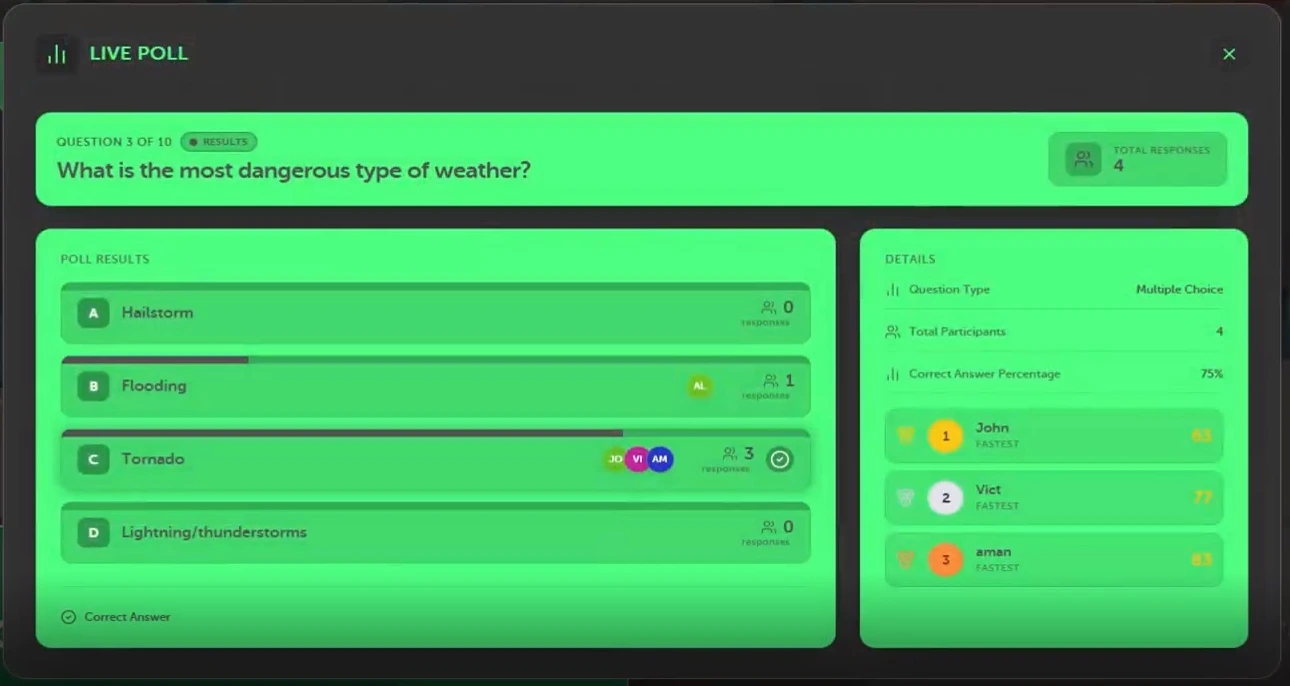
Example:
Lesson: Photosynthesis
Exit ticket question: “Which process allows plants to convert light energy into chemical energy?”
Answers: Photosynthesis / Respiration / Transpiration / Fermentation
Instead of waiting until the next class to review responses, the teacher can see immediately whether most students selected the correct answer and whether a concept needs clarification.
- Works with Trivia, Grid, and List game styles
- Available in Classroom or Crowd Mode
- Students participate from their devices
- Supports up to 2,000 players
- Students join using a 6-digit code or QR code
- No app download required
Learn how Live Poll works in TriviaMaker →
22. Five-Question Lightning Check
Example: Five short questions covering the day’s key points, answered digitally.
Best for: Lessons with several learning objectives.
What it tells you: A detailed breakdown of understanding by question, not just overall.
23. Vocabulary Check
Example: Match today’s key terms to their definitions.
Best for: Vocabulary-heavy subjects like science or ELA.
What it tells you: Whether students learned the language of the lesson, not just the concept.
24. Visual Response
Example: Choose the image that best represents today’s concept.
Best for: Younger learners or visual subjects.
What it tells you: Whether students can recognize the concept, not just define it.
25. Class-Wide Confidence Check
Example: Students rate their confidence digitally, and results display as a class-wide pattern.
Best for: Deciding whether to reteach the whole class or a small group.
What it tells you: Where the class stands as a whole, at a glance.
Turn your next exit ticket into a 5-minute interactive activity
Create a short classroom quiz, share it with students, and use their responses to see what needs another explanation.
How to Choose the Right Exit Ticket
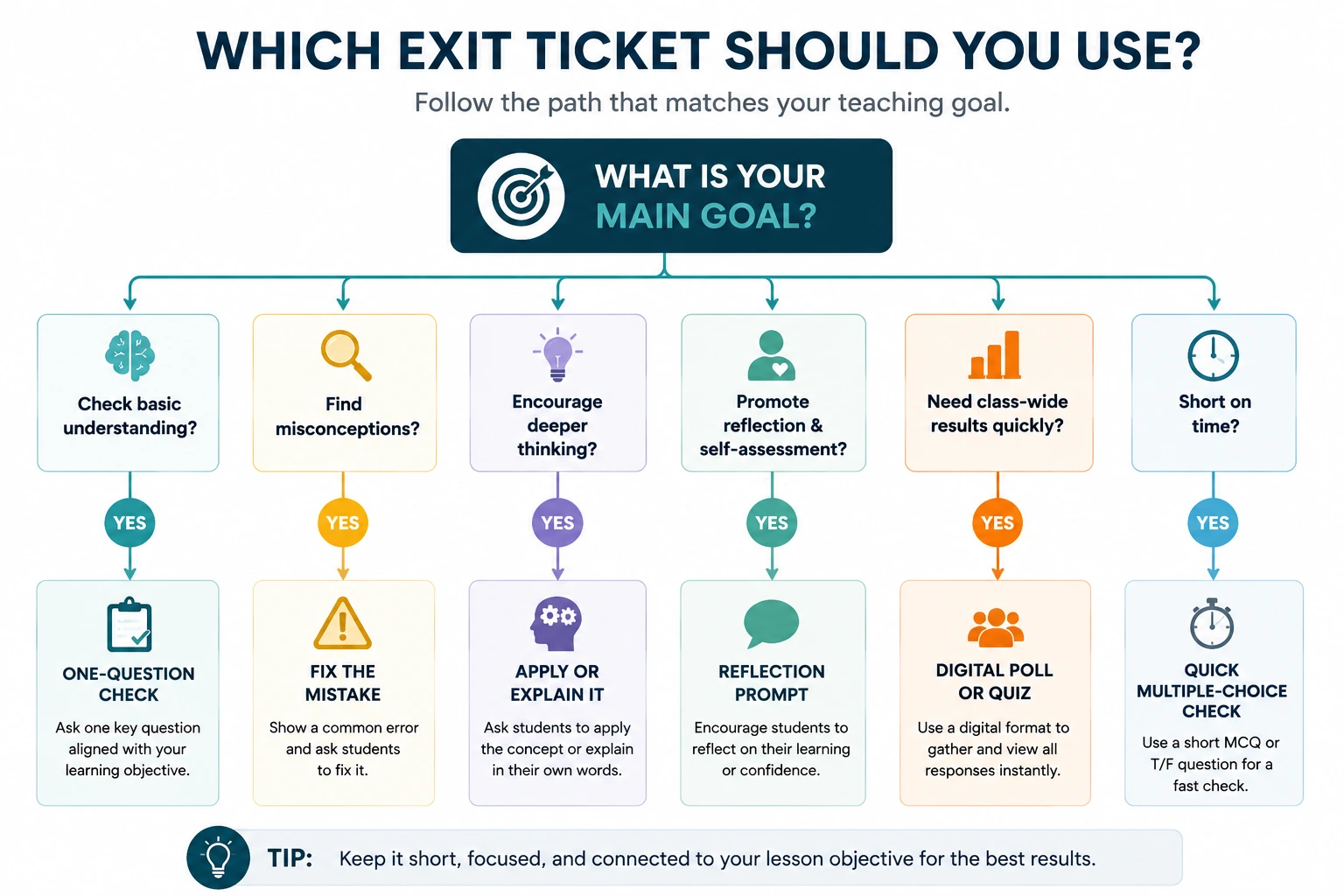
Use this table to match your goal for the day to the right exit ticket format.
| Your goal | Try this |
|---|---|
| Check basic understanding | One-question check |
| Find misconceptions | Fix-the-mistake |
| Measure confidence | Confidence check |
| Test application | New-situation question |
| Encourage reflection | One Thing I Learned |
| Check several objectives | 3–5 question check |
| See class-wide patterns | Digital interactive check |
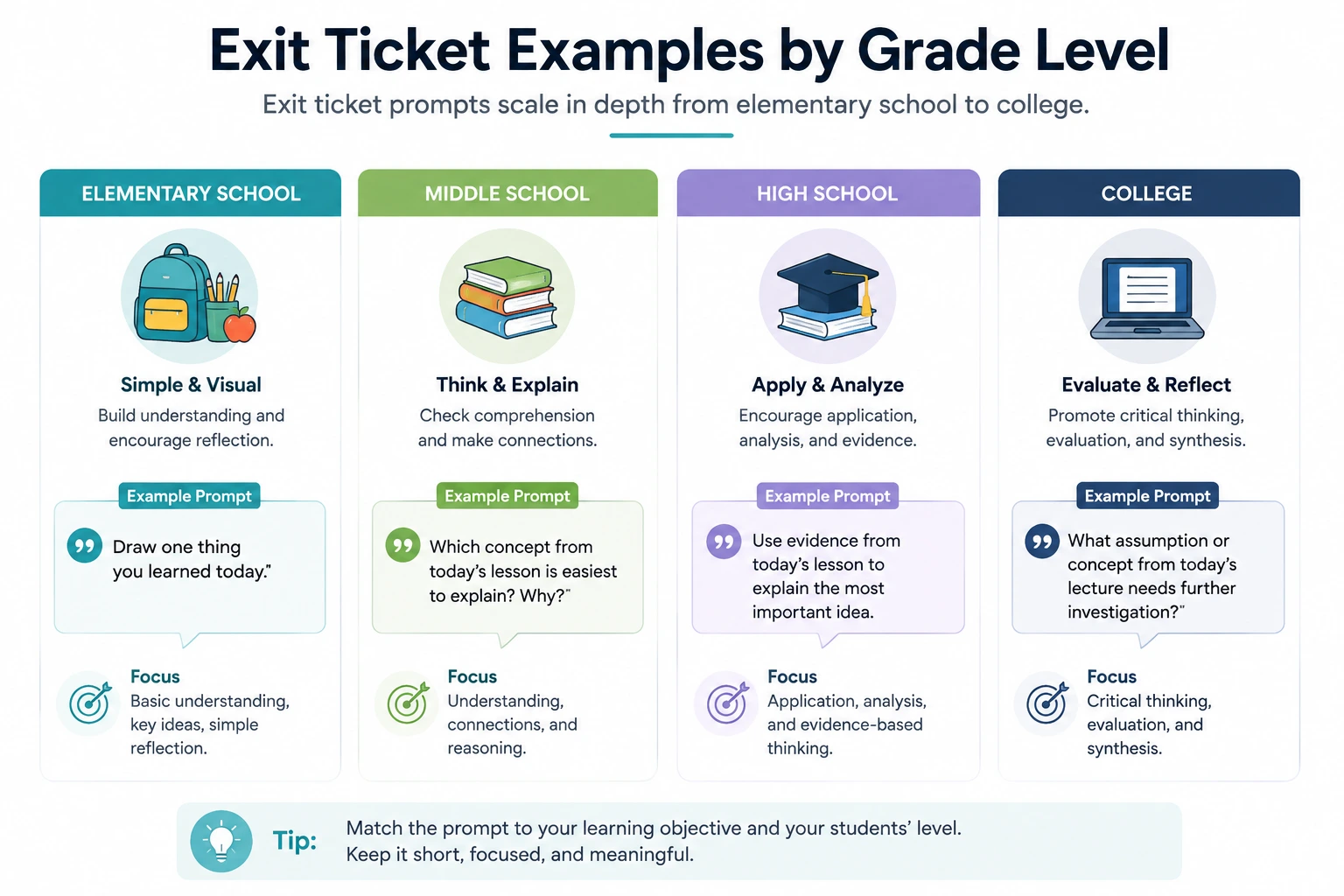
Exit Ticket Examples by Grade Level
Elementary School
Draw or write one thing you learned about today’s topic. Simple, visual prompts work best for younger learners who are still building writing stamina.
Middle School
Explain today’s concept in two or three sentences, including one example. This age group can handle slightly more explanation without much support.
High School
Use evidence from today’s lesson to support or challenge a given claim. High schoolers can handle prompts that require justification, not just recall.
College
Analyze how today’s concept connects to a broader theory or real-world case. College-level exit tickets can push toward synthesis and critical reflection.
Exit Ticket Examples by Subject
- Math: Solve one problem and explain your reasoning step by step.
- Science: Predict what would happen if one variable in today’s experiment changed.
- English/ELA: Identify one literary device used in today’s reading and explain its effect.
- History/Social Studies: Explain how today’s event connects to a cause discussed earlier in the unit.
- Geography: Label or describe one feature from today’s map or region.
- Foreign Language: Write one sentence using today’s new vocabulary correctly.
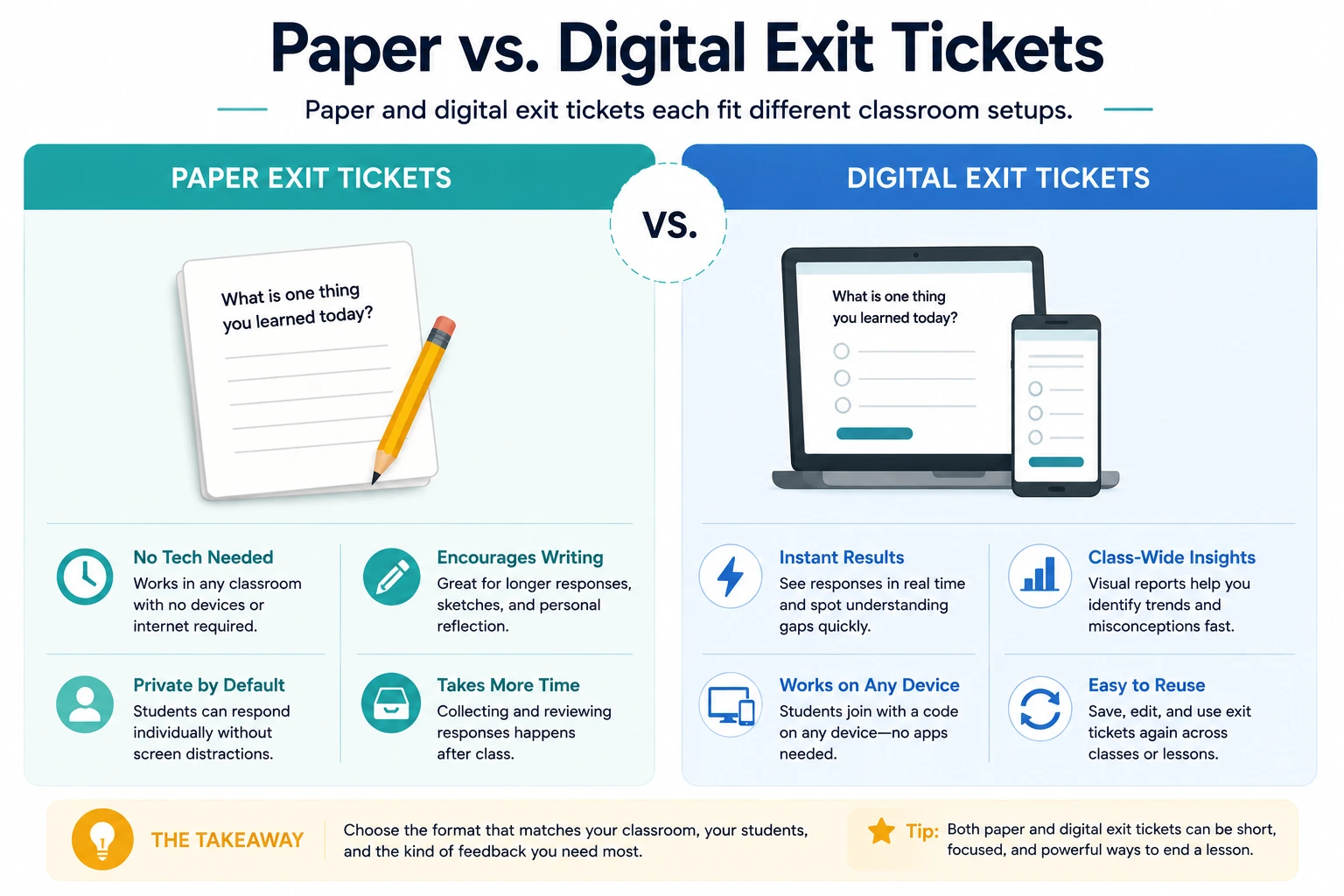
Paper vs. Digital Exit Tickets
Neither format is always better. The right choice depends on your classroom setup and what you’re trying to learn from student responses.
Paper exit tickets
Useful when:
- Students don’t have devices
- Reflection or drawing is important
- Teachers want handwritten responses
Digital exit tickets
Useful when:
- Every student has a device
- Teachers want responses collected quickly
- Teachers want class-wide response patterns
- The activity benefits from interactive participation
How to Create an Interactive Exit Ticket With TriviaMaker
If your students already use devices in class, an exit ticket can also become a short interactive activity rather than another sheet of paper.
If you need to create several questions quickly, TriviaMaker’s AI-powered quiz maker can help turn a topic into a starting set of questions in minutes.
- Choose the learning objective. Decide what you actually want to check before writing a single question.
- Select 2–5 questions. Keep it short enough to finish in the last few minutes of class.
- Create the activity. Build it in one of TriviaMaker’s 7 game styles, no student accounts required.
- Share it with students. Students join using a code, link, or QR code on any device.
- Review responses. See results in real time during a live activity, or asynchronously.
- Use the results to plan the next lesson. Decide what to reteach, review, or move past.
Here’s what that looks like in practice: a 10-question exit ticket built around a single lesson objective, ready to share with students in one click.
A Real Exit Ticket Example

Not every class runs the exit ticket live. If students are finishing at different times, or you want to assign it outside of class, Assignment Mode supports asynchronous digital exit tickets that still land in one place for you to review.
If exit tickets show a lesson-level gap that’s bigger than one class period, a full classroom review game can help you reteach a concept for the whole group, rather than repeating an exit ticket day after day.
Related Reads
Looking for more classroom strategies and tools? These guides pair well with exit tickets:
- Bell ringer activities – start-of-class ideas that bookend your exit tickets
- Interactive classroom games – full-class engagement ideas beyond exit tickets
- Classroom review games – reteach a concept for the whole group after an exit ticket reveals gaps
- First day of school games – set the tone before you start using exit tickets
- Icebreaker games for students – build classroom culture from day one
Frequently Asked Questions
What is the purpose of an exit ticket?
The purpose of an exit ticket is to check student understanding before the lesson ends. It helps teachers spot learning gaps, identify misconceptions, and gather feedback while the content is still fresh. This information shapes what happens in the next class.
How long should an exit ticket take?
An exit ticket should take two to five minutes to complete. It’s designed to be quick, not a full assessment. Longer exit tickets tend to run out of time at the end of class and cut into the response window, so shorter is usually more reliable.
What should an exit ticket include?
An exit ticket should include one to three questions tied directly to the lesson objective. Good exit tickets ask students to explain, apply, or reflect on what they learned rather than just recall a fact, since that gives the teacher more useful information.
Are exit tickets formative assessments?
Yes, exit tickets are a form of formative assessment. They’re used during the learning process, not after it, to check progress and guide instruction. Unlike a graded test, an exit ticket’s main purpose is to inform what the teacher does next, not to assign a score.
What is the difference between a bell ringer and an exit ticket?
A bell ringer happens at the start of class, while an exit ticket happens at the end. Bell ringers usually review prior learning or warm up thinking, while exit tickets check understanding of the lesson that just happened. See bell ringer activities for ideas that fit the beginning of class.
What are some good exit ticket questions?
Good exit ticket questions ask students to explain, apply, or reflect on the lesson objective, such as “What’s one thing you learned?” or “What’s still confusing?” rather than a simple yes-or-no question.
What are quick exit ticket ideas?
Quick exit ticket ideas include a one-question knowledge check, a five-word summary, a confidence rating, or a true-or-false question with a short explanation. Each takes under three minutes.
What is an example of a digital exit ticket?
A digital exit ticket might be a short online poll or a two-to-three question quiz students complete on a device, with results collected instantly for the teacher to review.
How do teachers use exit ticket results?
Teachers use exit ticket results to decide what to reteach, which students need extra support, and what the next lesson should cover, based on patterns in student responses.
Can exit tickets be used for any subject?
Yes. Exit tickets work across every subject and grade level. The format stays the same, but the question changes to match the subject’s key concepts and skills.
Don’t guess what your students understood. Check.
A few focused questions can give you a clearer picture of what to review, reteach, or move forward with.
Last updated August 2026. All exit ticket activities can be created free at TriviaMaker.com.