1
Choose the Wheel Game Style
Log in to your TriviaMaker account and head to the Create Game page. Pick "Wheel" as your game style to start building a spin-based trivia experience.
30 seconds
 Wheel Game Style
Create engaging wheel-based trivia games where a spinning wheel selects categories, questions, or challenges - perfect for classrooms, events, and team competitions.
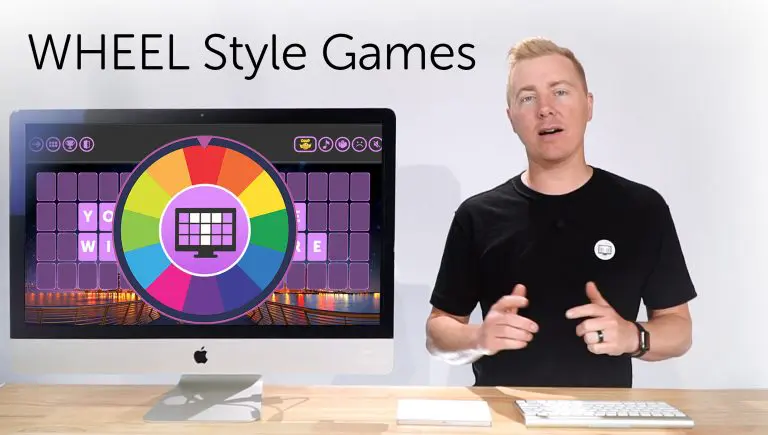
Trusted by educators & organizations worldwide











A Spinning Wheel Quiz Game is a game format where a wheel randomly selects categories, questions, or challenges to create an interactive trivia experience.
TriviaMaker Wheel Game Style is designed to bring this format online, allowing educators, trainers, and event hosts to run engaging live quiz sessions with a spinning wheel mechanic.
This format is widely used in classrooms, corporate training, and live events to increase engagement and participation.
It increases engagement by adding randomness, excitement, and game-show style interaction to traditional quizzes.
Try these ready-made Wheel Style games instantly - no sign-up required.
Build and launch a custom Wheel Style trivia game in three simple steps - no design or coding skills required.
Log in to your TriviaMaker account and head to the Create Game page. Pick "Wheel" as your game style to start building a spin-based trivia experience.
30 secondsDefine each wheel segment as a category - Sports, Movies, Science, anything. Assign questions to each segment manually, import from CSV, or generate with AI.
60 secondsStart your game and invite players to join with a 6-digit code or QR. Each round begins with a wheel spin - the segment it lands on decides what players answer next.
15 secondsMost spinner tools only select random items - TriviaMaker turns spins into a complete trivia game system.
| Feature | TriviaMaker Wheel Style | Wheel of Names | Wordwall Spinner | Flippity Spinner | Picker Wheel |
|---|---|---|---|---|---|
| Trivia Questions | Yes | No | Limited | No | No |
| Team Gameplay | Yes | No | Limited | No | No |
| Live Scoring | Yes | No | No | No | No |
| Game Modes | Multiple | None | Limited | None | None |
| Built for Events | Yes | No | Partial | No | No |
| Spinning Animation | Yes | Yes | Yes | Yes | Yes |
| Free to Use | Premium | Yes | Limited | Yes | Yes |
| Player Limit | 2 teams | N/A | Limited | N/A | N/A |
| Best For | Game nights, events, parties, classrooms | Random selection only | Classroom activities | Random selection only | Random selection only |
A wheel-based quiz transforms ordinary trivia into a high-energy game show experience.
Every spin is a surprise. Players never know which category is coming next, keeping energy levels high and preventing the predictable rhythm of standard quiz formats.
Perfect for classrooms and meetings where attention drifts. The anticipation of the spinning wheel pulls every participant back into the moment, round after round.
Bring game-show energy to birthday parties, holidays, and corporate mixers. The wheel becomes a focal point everyone gathers around - projected on a TV or shared screen.
Two teams compete head-to-head as the wheel decides their fate. Built-in scoring, sound effects, and a live leaderboard turn every spin into a moment worth cheering for.
The suspense of "what will the wheel land on next?" keeps players locked in until the very last spin. No more mid-game drop-off - every round feels like a fresh start.
Name each wheel segment anything you want - curriculum topics, product categories, training modules, or inside jokes. Map custom questions to every segment for a tailored experience.
From a single classroom to a 2,000-person auditorium, the spinning wheel format adapts to every setting.
Turn revision into a fun, interactive quiz where students compete in teams. The wheel picks topics randomly so every review session covers different ground.
Use wheel spins to randomize training questions and improve knowledge retention. Onboarding, compliance, and product training become activities employees look forward to.
Break the ice and energize audiences with real-time trivia competition. Project the wheel on the main stage and let attendees play along from their phones.
Make gatherings more interactive with unpredictable spin-based challenges. Birthdays, holidays, and weekend game nights become instant game-show experiences.
Keep remote participants engaged with live spinning-wheel trivia games. Share your screen on Zoom, Teams, or Google Meet - players join from any device.
Spark connection between teammates with collaborative wheel-based challenges. Perfect for hybrid teams, offsites, and quarterly all-hands gatherings.
Wheel Style works across Basic, Presenter, and Crowd modes.
pick the one that fits your room.
Ideal for individuals or small groups. Perfect for solo practice, quick classroom quizzes, or self-assessment activities where one player spins and answers.
Learn moreDesigned for host-led sessions. The presenter spins the wheel on the big screen while two teams compete - perfect for classrooms, training, and family events.
Learn moreEngage large audiences in real-time. While Wheel Style supports 2 teams, Crowd Mode in other styles scales to 2,000 participants - ideal for conferences and auditoriums.
Learn moreEverything you need to turn a spinning wheel into a complete, branded trivia game experience.
A smooth, game-show-quality wheel animation with realistic deceleration, sound effects, and a pointer that locks onto the winning segment every single spin.
Define each wheel segment as a category - Sports, Movies, Science, anything you can name. Assign custom questions to each segment for a fully tailored quiz.
Two teams compete head-to-head in Premium Wheel Style. Take turns spinning, answering, and racking up points on a shared leaderboard everyone can see.
Automatic scoring after every spin keeps the energy high. Project the live leaderboard on the main screen so teams always know where they stand.
Players join from any device with a browser - phone, tablet, or laptop. Hosts can project the wheel on smartboards, Apple TV, Android TV, or any screen.
Players join instantly with a 6-digit code or QR - no app download, no account required. Your wheel game is live the moment you click launch.
Choose the perfect plan for your needs. Every paid plan unlocks the Wheel game style along with 6 additional game styles.
Real stories from teachers, trainers, and event hosts who use TriviaMaker Wheel Style every week.

The spinning wheel completely changed our youth group nights. Kids actually ask for trivia now - they love the suspense of not knowing what category is coming next.

I use the Wheel Style for Friday review sessions. Two teams, random categories - my 4th graders stay locked in for the entire 20 minutes. Way better than any worksheet.

We projected the wheel on the big screen for our staff training day. People actually paid attention - the spin animation made every question feel like a game-show moment.
Everything you need to know about building and hosting Wheel Style trivia games with TriviaMaker.
A spinning-wheel trivia game is a quiz format where an animated wheel determines the question category before each round. TriviaMaker's Wheel Style uses this mechanic - the wheel spins on screen, lands on a category, and reveals a trivia question for players to answer. It adds suspense and energy to any quiz game.
In TriviaMaker, select Wheel Style when creating a game, add your categories and questions, then launch the game. The wheel animation is automatic - no setup required. Players join via a QR code or 6-digit game code on any device.
Wheel Style is a Premium feature. The free plan includes Grid, Trivia, and List styles. Premium plans start at $19/year and unlock Wheel Style along with all other game formats.
Wheel Style supports 2 teams per game. For larger audiences, Grid Style and List Style support Crowd Mode with up to 2,000 simultaneous participants. Explore all 7 game styles →
Yes. TriviaMaker runs entirely in the browser - share your screen on Zoom, Teams, or Google Meet and the spinning wheel animation is visible to all participants. Players join on their own devices via a link or game code.
Wheel of Names is a pure name/item randomizer - it spins and picks a result, but has no built-in trivia questions, scoring, or competitive gameplay. TriviaMaker Wheel Style combines the spinning mechanic with a full quiz engine: custom questions, live leaderboards, team competition, and sound effects - all in one tool.
Most Wheel Style games run 10–20 minutes depending on the number of questions. The spinning animation adds 5–10 seconds of suspense per round, which is a deliberate engagement feature for event and party contexts.
Yes. Each segment on the wheel corresponds to a question category you define. You can name the categories anything and assign questions to each one - perfect for themed events, curriculum topics, or branded corporate training.
Yes. Both game creation and gameplay are fully optimized for iOS and Android browsers. Players join from any smartphone or tablet - no app download required. Hosts can also use the TriviaMaker mobile app available on the App Store and Google Play.
Absolutely. You can upload questions from Excel (.xlsx), CSV, or connect a Google Sheet and map your category column to wheel segments. You can also use the AI question generator to build a complete wheel game from a single topic prompt in under a minute.
Turn your next quiz into a live game-show experience with spinning wheel excitement.