Strategy Meets Knowledge
Unlike speed-based quiz formats, TicTac rewards smart positioning. Teams must choose which square to contest, not just who can answer fastest - adding a layer of depth that keeps older students and adults engaged.

 TicTac Game Style
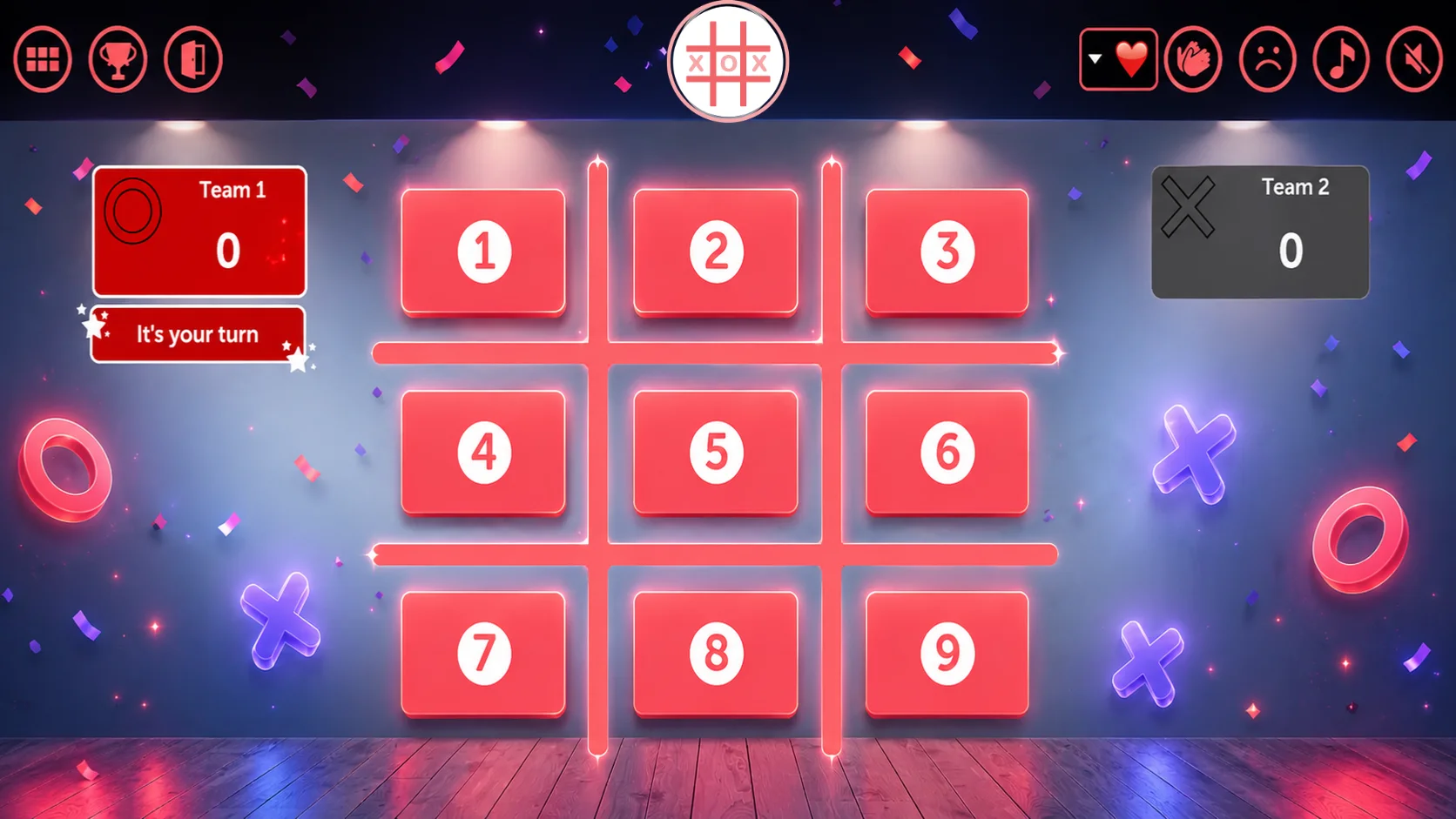
TriviaMaker's Tic Tac Style is an interactive quiz game that combines Tic Tac strategy with trivia questions. Two teams compete to claim squares on the board by answering correctly. The first team to get three in a row wins. No student logins. No devices needed. Just project and play.
Trusted by educators & organizations worldwide











A TicTac Trivia Game is a quiz format that combines the classic 3×3 Tic-Tac-Toe grid with competitive trivia gameplay. Two teams earn the right to place their mark on the board by correctly answering trivia questions - the first team to get three in a row wins.
TriviaMaker's TicTac Game Style brings this format online, letting teachers, trainers, and event hosts build and run live TicTac trivia games from any device. Create questions manually, import a CSV, or use AI to generate a full game in seconds.
This format is especially popular in K–12 classrooms, corporate training, youth groups, and team-building events because it layers strategy on top of knowledge - teams can't just answer fast, they have to think about position.
Students or players don't need accounts or app downloads. The host projects the board on a shared screen; teams compete face-to-face.
Build and launch a custom Tic Tac Toe quiz game in under 3 minutes - no design or coding skills required.
Log into TriviaMaker and head to Create Game. Select "Tic Tac" as your game style. Choose a theme, add a title, and you're ready to build - the board is automatically set up as a 3×3 grid.
30 secondsAssign trivia questions to each of the nine squares. Type them manually, import from a CSV or spreadsheet, or use the AI question generator to create a full board from any topic in seconds.
60–90 secondsLaunch the game and project it on your SmartBoard or share your screen on Zoom. Split students into two teams. Teams take turns picking squares, answering questions, and racing to get three in a row.
15 seconds to launchTry these ready-made Tic Tac Style games instantly - no sign-up required.
No other major quiz platform offers a Tic Tac Toe board format. See exactly what makes this unique.
| Feature | TriviaMaker Tic Tac | Kahoot | Blooket | Quizizz |
|---|---|---|---|---|
| Tic Tac Toe board format | ✓ Yes - full 3×3 board | ✕ Not available | ✕ Not available | ✕ Not available |
| Strategic gameplay layer | ✓ Yes - pick squares strategically | ✕ Linear quiz only | ⚡ Mini-game mechanics only | ✕ Linear quiz only |
| Student login required | ✓ Not required (team play) | ⚡ Nickname required | ✕ Account required | ⚡ Optional for some modes |
| Works on one projected screen | ✓ Yes - Presenter Mode | ✕ Requires student devices | ✕ Requires student devices | ⚡ Partial support |
| Free plan player limit | ✓ 20 participants (Crowd Mode) | ✕ 10 players only | ⚡ Varies by mode | ⚡ Limited features free |
| AI question generator | ✓ Yes | ⚡ Paid only | ✕ Not available | ⚡ Paid plans |
| Custom branding & themes | ✓ Logo, colors, music, fonts | ⚡ Higher paid tiers only | ✕ Limited | ⚡ Paid only |
| Best annual price (teacher) | $19 / year | $228 / year | $35.88 / year | $120 / year |
TicTac transforms ordinary quiz sessions into tactical team battles that demand both knowledge and strategy.
Unlike speed-based quiz formats, TicTac rewards smart positioning. Teams must choose which square to contest, not just who can answer fastest - adding a layer of depth that keeps older students and adults engaged.
The board format naturally creates head-to-head rivalry. Two teams with distinct X and O identities compete for territory - every correct answer feels like a win for the team, not just one student.
Because a single correct answer can block the opposing team's winning move, every question carries tension right to the end - even when one team is ahead on squares.
The combination of recall, discussion, and shared team decision-making creates stronger memory encoding than individual multiple-choice formats. Review sessions actually stick.
Project the board on a SmartBoard or monitor. Teams discuss answers together and one spokesperson responds. No phones, no logins, no chaos - maximum class focus.
History, math, science, vocabulary, company policy, product training - if you can write a question about it, it works in TicTac. The format is content-agnostic.
From elementary classrooms to corporate boardrooms, TicTac adapts to any setting where two teams can go head-to-head.
Turn end-of-unit review into a competitive board game. Split students into two teams and let them battle for the 3×3 grid using curriculum content. Works for any subject, any grade level.
Use TicTac for vocabulary challenges, definitions, spelling, or grammar rules. The team format removes the pressure of individual spotlight while keeping everyone focused on the content.
Divide new hires or training groups into two teams. TicTac makes compliance, product knowledge, and process training genuinely engaging without feeling like a chore.
Perfect for offsites, staff days, and team workshops. The head-to-head format creates conversation, laughter, and friendly rivalry that brings colleagues together.
Share your screen on Zoom, Microsoft Teams, or Google Meet and run a live TicTac game with remote teams. No extra setup - just share and play.
Youth ministries, after-school programs, and community gatherings love TicTac for its familiar format and competitive energy. Kids already know the rules - just add trivia.
Tic Tac Style works across Basic, Presenter, and Crowd modes - pick the one that fits your room.
Quick setup for individuals or small groups. Perfect for solo practice, study groups, or informal classroom sessions where you want fast, low-friction gameplay with up to 2 teams.
Learn moreHost-led gameplay on a big screen or shared display. The teacher controls the board and pacing while two teams compete by responding verbally or as groups. Zero student devices needed.
Learn moreEvery student joins on their own phone via a game code - no app download, no account. Students answer individually while the board plays out on the projected screen. Scales to 2,000 on Enterprise plans.
Learn moreEverything you need to run a competitive, strategic trivia board game - on any screen, in any setting.
A clean, real-time 3×3 board that updates live as teams place their marks. The visual board makes every round tangible and builds tension with each answered question.
Two clearly defined teams compete in turns. Each team picks a square, answers the question, and either claims it or hands the turn over. Simple mechanics, maximum drama.
Enter a topic or upload a document and get a complete set of trivia questions in seconds. Edit and refine before going live - or use AI output as-is for fast game creation.
Track team scores throughout the game. When the board is complete or a team wins, a results screen displays the outcome - giving every session a satisfying conclusion.
Add your school or company logo, brand colors, and custom background images. Upload team names, theme music, and photos to make every TicTac game feel like yours.
Project from any device - laptop, tablet, SmartBoard, Apple TV, Android TV. No app download, no player accounts. The host runs it, everyone watches and participates together.
Start free. Upgrade when you need more players or features. Every paid plan includes full Tic Tac Style access along with all six other game styles.
Limited time - new users only
Real stories from teachers, trainers, and event hosts who use TriviaMaker TicTac Style every week.

My youth group had tried quiz games before, but TicTac was different. The kids were actually strategizing - arguing about which square to go for. That's when you know a game is working.

I switched from standard quiz formats to TicTac for Friday review and never looked back. The two-team format means everyone is paying attention - even when it's the other team's turn. The strategy element keeps them engaged.

We use TicTac for onboarding trivia at our company. New hires are split into teams and have to work through product knowledge questions to claim squares. It breaks the ice and the content actually sticks.
Everything you need to know about building and hosting TicTac Style games with TriviaMaker.
A TicTac Trivia Game combines the classic 3×3 Tic-Tac-Toe grid with competitive trivia gameplay. Two teams alternate turns - each turn a team picks a square on the board, then answers a trivia question. A correct answer places their mark (X or O) on the square. The first team to get three marks in a row - horizontally, vertically, or diagonally - wins the round.
In TriviaMaker, select TicTac Style when creating a game, add your questions (manually, via CSV import, or using the AI generator), and launch. Divide your group into two teams, project the board on a shared screen, and let teams take turns choosing squares. The board updates automatically after each answer.
TicTac Style is a Premium feature. The free plan includes Grid, Trivia, and List styles. Premium plans start at $19/year and unlock TicTac along with all other game styles. There's a 7-day money-back guarantee on all paid plans.
TicTac Style is built for two competing teams, with any number of students or participants on each team. The host projects the board on a shared screen; team members discuss answers together and one person responds per turn. For large-scale individual play, explore other game styles like Grid or List with Crowd Mode supporting up to 2,000 players.
No. Students don't need any device, account, or app download for TicTac gameplay. The host runs the game on their device and projects it on a shared screen. Both teams watch the same board and take turns responding verbally or by indicating their choice. It's entirely projection-based, which removes all tech friction from the classroom.
Kahoot is a speed-based individual quiz - every student needs a device and answers as fast as possible. TicTac is a strategy-based team game played on a shared projected screen. Students work together, discuss answers, and think about board position - not just who can click fastest. TicTac tends to produce better classroom discussion and deeper engagement with the content. Compare TriviaMaker vs. Kahoot →
Yes. TriviaMaker runs entirely in the browser - just share your screen on Zoom, Teams, Google Meet, or Webex. The TicTac board is visible to all participants on the call. For remote teams, split participants into two breakout groups or simply call out answers live in the chat or verbally through the call.
Yes. You can add questions manually, import via CSV or Excel, or use the AI question generator to create a full set from a topic or uploaded document. All question types - multiple choice, true/false, open-ended - work in TicTac. Once built, your game is saved and reusable.
TicTac is the only TriviaMaker format that adds a spatial/positional strategy layer to trivia. Unlike Trivia Style (speed-based individual play), Grid Style (category board), or Wheel Style (spin-to-reveal), TicTac teams must balance answering correctly with blocking the opponent's winning moves. It rewards both knowledge and tactical thinking.
Yes. TriviaMaker's Fusion Game Style lets you mix multiple formats in a single session - for example, a Grid round, then a TicTac round, then a Trivia round. Ideal for longer events and training sessions where variety maintains engagement throughout.
Turn your next review session or training day into a strategic team battle everyone will remember.