
Updated September 2026
Pricing, participant limits, features, and plan availability can change. Information in this comparison was checked against the providers’ official sources in September 2026. See the official pricing and help pages for the latest details.
In today’s attention economy, the line between an engaged audience and a distracted one is razor-thin. For educators, trainers, and event hosts, transforming passive listeners into active participants is the ultimate challenge. Two platforms have emerged as powerful tools to bridge this gap, but they take fundamentally different approaches: Kahoot!, the household name in interactive learning and engagement, and TriviaMaker, the versatile specialist built for game-show-style experiences.
This is a head-to-head comparison focused specifically on Kahoot vs. TriviaMaker. If you are looking for a broader list of alternatives, check out our full Kahoot alternatives guide.
Bottom Line
TriviaMaker offers 7 game-show-style formats and annual plans starting at $19/year, making it a strong value for teachers, trainers, and event organizers. Kahoot provides a broader ecosystem with 12+ question types and extensive ready-made content, with paid plans starting at $19/month (billed annually). The best choice depends on whether you prioritize game-show variety (TriviaMaker) or a comprehensive interactive learning platform (Kahoot).
📌 Key Takeaways
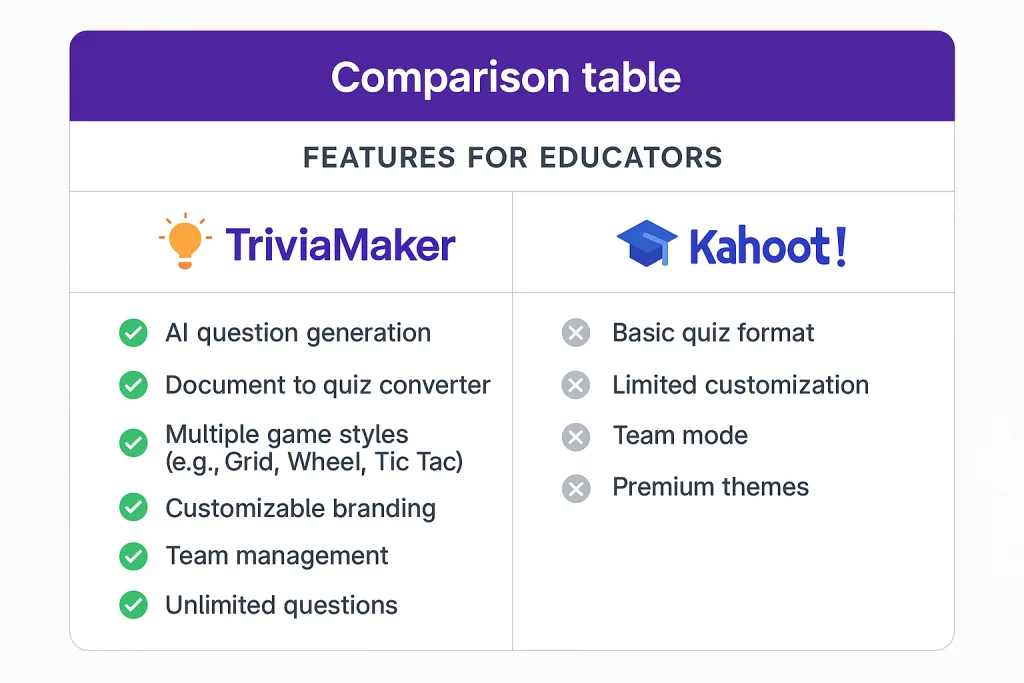
- TriviaMaker: 7 game styles (Grid, Wheel, Tic-Tac, Hangman, Fusion, List, Trivia) + AI generator + free 20-player Crowd mode.
- Kahoot: 12+ question types (Poll, Word Cloud, Puzzle, etc.) + massive ready-made library + free 10-player personal plan.
- Pricing: TriviaMaker Premium = $19/year; Kahoot 360 Pro Start = $228/year (billed annually).
- Participant setup: Both allow live joining without participant accounts. TriviaMaker offers a zero-app, QR-code join flow.
- Best for: Choose TriviaMaker for game-show variety and low annual cost; choose Kahoot for its mature educational ecosystem and broad question types.
At a Glance: Kahoot vs TriviaMaker
Before we dive into the details, here’s a quick overview of how these two platforms compare.
| Feature | Kahoot! | TriviaMaker |
|---|---|---|
| Core Philosophy | Broad interactive learning and engagement ecosystem with multiple question types, presentation features, and plan-specific capabilities. | Turning quizzes into game-show-style experiences using seven distinct game styles. |
| Best For | Established educational ecosystem, interactive presentations, learning experiences, and plan-specific professional features. | Game-show-style quizzes, classroom review games, small-team training, parties, events, and interactive sessions. |
| Game Styles / Question Types | Multiple question types including Quiz, True/False, Type Answer, Puzzle, Slider, Pin Answer, Poll, Word Cloud, Open-ended, and more – availability varies by plan. | 7 game styles: Grid, Trivia, List, Wheel, Tic-Tac, Fusion, and Hangman. |
| Participant Access | Generally requires a game PIN and participant nickname; no account needed for most live games. | No participant account required – join via code or QR code, no app download needed. |
| Customization | Varies by plan; includes branding, logo, and presentation features on higher tiers. | Advanced customization including logos, colors, backgrounds, music, and more on paid plans. |
| Starting Price | Free plan available; paid plans start at $19/month (billed annually) for Kahoot! 360 Pro Start. | Free plan available; Premium at $19/year; Premium Plus at $39.99/year (limited-time offer). |
🚀 Where TriviaMaker May Be a Better Fit
Try TriviaMaker free and experience 7 game styles, AI question generation, and affordable annual pricing.
🎯 Try TriviaMaker Free – 20 Players, 7 Game Styles, No Credit CardNo credit card required • Setup in 2 minutes • Free forever plan
The Core Difference: Quiz Platform vs. Game-Show Variety
Understanding the fundamental design philosophy behind each platform is key to understanding their strengths.
What is TriviaMaker? TriviaMaker is a dedicated game-show platform that turns any content into interactive experiences using 7 distinct game styles – Grid, Wheel, List, Tic-Tac, Hangman, Fusion, and classic Trivia. It is designed for classrooms, corporate training, and events where presentation quality and participant ease matter.
Kahoot! built its reputation on interactive learning and engagement. It offers a broad ecosystem with multiple question types, presentation features, learning experiences, and plan-specific capabilities. The entire experience is designed to be accessible: create content quickly, get players in with a PIN, and run interactive sessions.
TriviaMaker, however, was designed with a different focus: turning quizzes into game-show-style experiences. While it’s also easy to use, its emphasis is on game-style variety and presentation quality. It’s built not just for asking questions, but for hosting a full-fledged game show with multiple formats.
Feature-by-Feature Breakdown: Where the Differences Shine
Let’s get into the specifics. Here is a detailed breakdown of the features that matter most to educators, trainers, and event professionals.
1. Game Modes & Variety: Beyond the Basic Quiz
This is one of the most significant differentiators between the two platforms. Variety is the key to sustained engagement. When evaluating quiz platforms, it’s helpful to see a comprehensive Blooket, Gimkit, and Kahoot comparison to understand the full landscape of options available.
- Kahoot offers a broad range of question types and interactive experiences, with specific capabilities depending on the plan. These include:
– Quiz (multiple choice)
– True or False
– Type Answer
– Puzzle
– Slider
– Pin Answer
– Poll
– Word Cloud
– Open-ended
– Brainstorming
– Slides and presentation-oriented experiences
The exact availability of these question types varies by plan. - TriviaMaker provides a rich suite of 7 game styles:
– Grid: A classic game with categories and point values. Perfect for reviewing broad topics and allowing teams to strategize.
– Wheel: A spin-to-win wheel that adds an element of luck and excitement.
– Trivia: A straightforward Q&A format with multiple choice answers.
– List: A “survey says” format where players guess the top answers.
– Tic-Tac: A strategic team-based game combining trivia with tic-tac-toe.
– Hangman: A word-guessing game ideal for vocabulary building and spelling practice.
– Fusion: Combine multiple game styles into one seamless session.
This variety is a major advantage. It allows a teacher to use a Grid game for history review, Hangman for science vocabulary, and Tic-Tac for math problems – all within the same platform.
2. User Experience: For Hosts and Players
A great quiz platform must be a joy for both the person hosting and the people playing.
- For the Host: Both platforms offer user-friendly dashboards. TriviaMaker offers pre-made game templates and AI-powered quiz generation from any topic or uploaded PDF. Kahoot offers AI generation, slide import, and extensive ready-made content libraries.
- For the Players: This is a critical point where the platforms differ.
– With Kahoot, participants go to kahoot.it or open the Kahoot app, enter a game PIN, and add a nickname. No account is required for most live games. According to Kahoot’s Help Center, participants can join a live Kahoot without an account by entering the game PIN and nickname. However, if a host enables the “Player identifier” setting, participants may need to provide an email address.
– TriviaMaker’s key advantage is its zero-setup approach for participants. Players don’t need to download an app, create an account, or even have a personal device in some modes. They simply join via a 6-digit code or QR code on any device. This removes barriers to entry, making it fast and easy to get everyone involved.
3. Customization & Branding: Making It Your Own
For corporate trainers, HR professionals, event planners, and teachers who want to add a personal touch, customization is paramount.
- Kahoot offers customization that varies by plan. Higher-tier plans (like Kahoot! 360 Pro Plus and Pro Max) include features such as adding your own company logo and branding, along with professional hosting capabilities.
- TriviaMaker excels in this area, especially with its paid plans. It offers professional-level options including:
– Custom logos, colors, backgrounds, and music
– Custom team features and discount pricing
– All customization features available on Premium and Premium Plus plans
This makes TriviaMaker a strong choice for anyone looking to create a branded, professional experience. For a company running a sales training, being able to embed the company logo and use industry-specific terminology elevates the activity from a simple game to a polished, branded training module.
4. Analytics & Reporting: Measuring Success
Data is crucial for understanding what your audience has learned and where the knowledge gaps are.
- Kahoot offers reporting capabilities that vary by plan. Features include secure email verification, combining data from multiple presentations, tracking session impact, and spotting knowledge gaps. Higher-tier plans include NPS and survey features for measuring satisfaction and engagement.
- TriviaMaker offers scoring, participation tracking, and reporting features across its plans. The platform provides real-time leaderboards and participant analytics. Enterprise plans include advanced team features and priority support.
Ready to Experience the TriviaMaker Difference?
Join thousands of educators, corporate trainers, and event organizers who use TriviaMaker for professional, engaging, and affordable quiz experiences. Create your free account today.
Use Cases: Who Is Each Platform REALLY For?
Based on these feature differences, let’s look at the ideal scenarios for each platform.
K-12 Classroom & Higher Education
For educators looking to enhance student engagement, modern quiz platforms offer powerful tools for interactive learning.
- Kahoot is a solid choice for interactive classroom reviews, assessments, and student participation. Its established educational ecosystem, broad question types, and extensive ready-made content library make it a familiar tool for many educators.
- TriviaMaker is an excellent choice for teachers who want game-show-style variety. The no-sign-in feature is a massive time-saver – you can project the game and have students participate without managing individual devices and PIN entries. The variety of game styles allows you to tailor the activity to the subject matter.
Corporate Training, HR & Team Building
- Kahoot can work for professional presentations, training sessions, and team engagement. Its business plans include features like slide import, Q&A, word clouds, brainstorms, polls, and professional hosting capabilities.
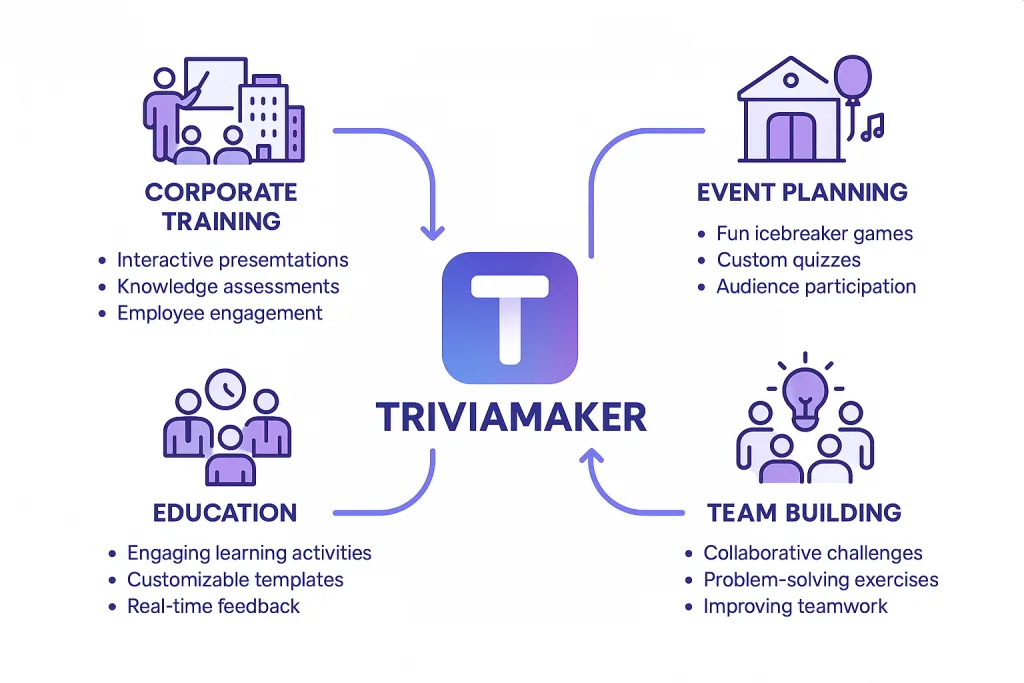
- TriviaMaker is built for this world. Its customization options allow you to create branded training modules. The variety of game modes can be adapted for numerous corporate needs:
– Sales Training: Use a Grid game to review product features.
– Compliance Training: Use Tic-Tac or Hangman to make dry material more interactive.
– Team Building: Wheel or Trivia games about company history foster camaraderie.
Event Planners, Virtual Parties & Social Gatherings
- Kahoot can be used for events, parties, and social gatherings, with plans that scale up to 5,000 participants for enterprise events.
- TriviaMaker is a strong tool for professional and large-scale events. Its ease of use, game-show formats, and zero-setup for participants make it easy to run engaging trivia events. You can simply put the game on the main screens and let the fun begin.
How Much Does Kahoot Cost?
Kahoot pricing varies by product and plan. Here’s a summary of current offerings based on official Kahoot sources.
Kahoot! 360 (Business/Professional):
- Pro Start: $19/month (billed annually at $228/year) – up to 50 participants per session
- Pro Standard: – up to 200 participants per session
- Pro Plus: $49/month (billed annually at $588/year) – up to 1,000 participants per session
- Pro Max: – up to 2,000 participants per session
- Pro Ultra: – up to 5,000 participants per session
Kahoot!+ Study (Personal/Social):
- Go: Free – up to 10 participants
- Bronze: $3/month (billed annually at $36/year) – up to 50 participants
- Silver: $9/month (billed annually at $108/year) – up to 100 participants
- Gold: $25/month (billed annually at $99/year) – up to 200 participants
- One: – up to 800 participants
Pricing verified September 2026. See our full Kahoot pricing breakdown for every tier.
TriviaMaker Free Plan
Basic (Free) includes:
- 3 game styles (Grid, Trivia, List – limited)
- Basic & Presenter mode (2 teams)
- Buzz mode (20 buzzers)
- Crowd mode (20 participants)
- All customization features disabled
- All team features disabled
Paid Plans
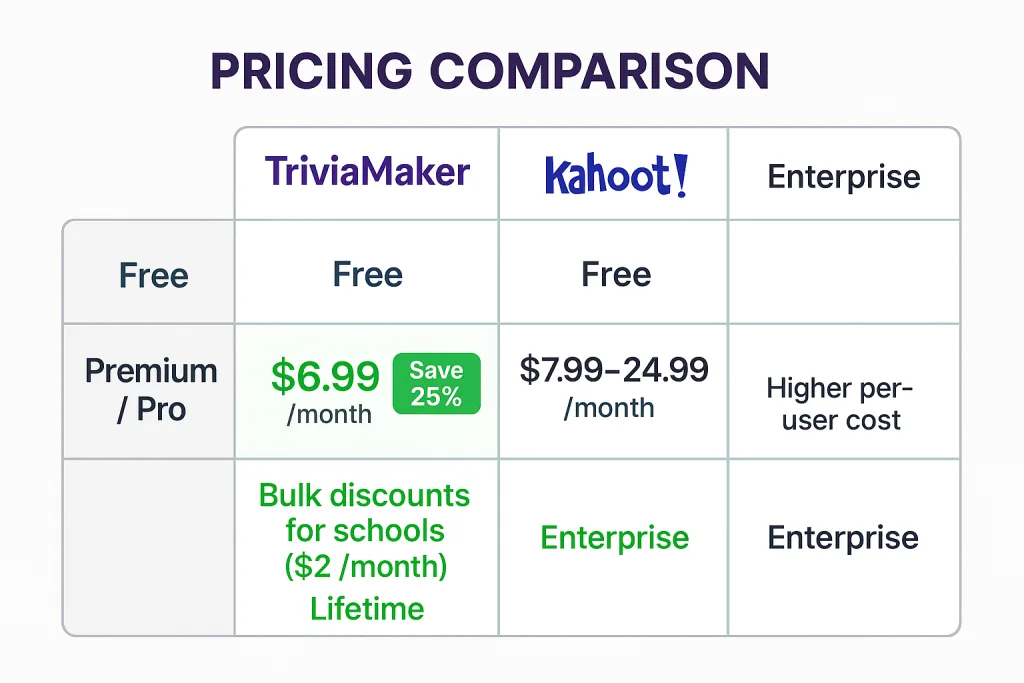
- Premium: $6.99/month (billed monthly) or $19/year (billed annually) – All 7 game styles, Crowd mode (50 participants), AI generator, custom branding
- Premium Plus: $39.99/year introductory/limited-time offer (regular price $99.99/year) – Crowd mode (200 participants), bulk import, assignment & embedded modes, all 7 game styles, AI generator
Enterprise: Custom pricing – Up to 2,000 participants depending on mode/use case, advanced organization features.
For advanced needs (custom branding, analytics, full team features), TriviaMaker’s paid plans offer strong value. Compare all plans →
Which Is More Affordable: Kahoot or TriviaMaker?
Affordability depends on your requirements.
TriviaMaker may be the better value if you:
- Want multiple game-show-style formats (Grid, List, Wheel, Tic-Tac, Fusion, Hangman, Trivia)
- Want AI-assisted question generation
- Want a low annual cost ($19/year for Premium, $39.99/year for Premium Plus limited-time offer)
- Run classroom review games, small-team training, or organize parties and events
- Need up to 200 participants in Premium Plus Crowd Mode
- Want a straightforward participant joining experience
Kahoot may make more sense if you:
- Already use Kahoot extensively
- Need Kahoot-specific learning experiences and question types
- Want its established educational ecosystem and ready-made content library
- Need specific presentation features available on higher-tier plans
- Already have an existing Kahoot subscription or organizational deployment
The Verdict: Making Your Choice in 2026
Both Kahoot and TriviaMaker are capable platforms, but they are designed for different priorities.
Choose Kahoot if:
- You want a broad interactive learning and engagement ecosystem
- You need multiple question types and presentation features
- You value an established educational platform with extensive ready-made content
- You’re already familiar with Kahoot or have an existing subscription
Choose TriviaMaker if:
- You value game-show-style variety with seven distinct game formats
- You want a professional, presentation-grade experience with customization options
- You prefer a zero-setup experience for participants to maximize ease of use
- You’re looking for a particularly affordable annual pricing option
- You need AI-assisted question generation from any topic or document
- You want a platform that adapts to classrooms, corporate events, and social gatherings
TriviaMaker offers a particularly affordable way to create and host interactive quizzes and game-show-style experiences, especially for teachers, small teams, trainers, and event organizers. Its combination of seven game styles, AI question generation, participant-friendly joining, and low annual pricing can make it strong value for many use cases.
Kahoot remains a strong choice for users who specifically need its broader educational, presentation, learning, or professional ecosystem.
Future Trends in Interactive Learning
The landscape of educational and corporate technology is constantly evolving. We’re seeing a rise in hybrid events, demand for deeper integrations, and the use of AI to generate quiz content automatically. Platforms that are flexible and built on robust architecture will be best positioned to adapt.
TriviaMaker’s focus on game-show-style variety, customization, and affordable pricing places it in a strong position for interactive engagement. Kahoot’s established ecosystem and broad feature set continue to make it a major player in the space.
You Might Also Like
- Kahoot Alternatives – Full Comparison (broader list of alternatives)
- How to Create a Kahoot-Style Quiz
- Games Like Kahoot
- How to Host Kahoot for Free
- Kahoot Alternatives for Large Groups
- Kahoot vs Quizizz
- Blooket vs Kahoot
- Blooket vs Gimkit vs Kahoot
- Detailed Kahoot Pricing Guide
Frequently Asked Questions (FAQ)
How much does Kahoot cost compared to TriviaMaker?
Kahoot’s paid plans start at $19/month (billed annually at $228/year) for Kahoot! 360 Pro Start, with higher tiers up to $49/month (billed annually) for Pro Plus. Personal plans start at $3/month (billed annually).
TriviaMaker offers a free plan, Premium at $19/year, and Premium Plus at $39.99/year (limited-time offer).
What are the disadvantages of Kahoot?
Potential disadvantages depend on the use case. Some features, participant limits, or advanced capabilities may require specific paid plans. The platform has multiple product categories with varying feature sets, so it’s important to compare the specific plan that matches your needs. See Kahoot’s official pricing page for current details.
Is the TriviaMaker free plan really free?
Yes! The TriviaMaker Basic plan is completely free forever with no credit card required. It includes 3 game styles (Grid, Trivia, List – limited), Basic & Presenter mode, Buzz mode (20 buzzers), and Crowd mode (20 participants).
Is TriviaMaker better than Kahoot for free users?
TriviaMaker’s free plan gives you 3 game styles and 20 Crowd participants. Kahoot’s free plan offers limited features with up to 10 participants for personal use. The choice depends on whether you prefer game-show-style variety (TriviaMaker) or Kahoot’s broader question types and established ecosystem.
If you want a broader roundup of every option beyond just these two platforms, see our full Kahoot alternative comparison.
Where can I read TriviaMaker reviews?
You can find TriviaMaker reviews throughout this article from real educators and corporate trainers. Additionally, you can explore user testimonials on our website and try the platform yourself with our free quiz maker for teachers.
Do teachers still use Kahoot?
Yes, many teachers still use Kahoot. It remains an active education platform with teacher-focused products and documentation. However, many educators also use TriviaMaker for its game-show-style variety and affordable pricing.
Which platform is better for corporate training?
It depends on your needs. Kahoot offers professional/business features including slide import, Q&A, word clouds, brainstorms, polls, and professional hosting. TriviaMaker offers game-show-style formats, customization, AI question generation, and affordable annual pricing. Consider your specific training goals, audience size, and budget.
Ready to Join Thousands of Happy Educators and Trainers?
Experience the TriviaMaker difference yourself – no credit card required
Start Creating Free Now